
A budget grocery list should stop the $8 bag of spinach from becoming expensive fridge compost. If yours is just a hopeful collection of food, build it from your budget, your actual week, and what is already in your kitchen.
The basic method is simple: check what you have, choose a few meals that share ingredients, write exact quantities, organize the items by store section, and estimate the total before you leave home. That gives every item a job. It also makes it much easier to spot the extras that quietly push a grocery trip over budget.
Here is how to do it without turning Sunday night into a spreadsheet project.
Start with a five-minute kitchen check
Look through the fridge, freezer, and pantry before choosing meals. You are not taking a full inventory. You are finding ingredients that need to be used and staples you do not need to buy again.
Open jars and half-used produce matter most. If you have half a cabbage, two carrots, eggs, and rice, you already have the base for fried rice and a slaw. Add only the missing protein, aromatics, or sauce. That is cheaper than picking a recipe that requires nine unrelated ingredients.
Check quantities too. Seeing pasta in the cupboard is not enough if there is only one serving left. A quick look prevents both duplicates and emergency return trips.
Choose three meal anchors, not seven perfect dinners
Most weeks change. Someone works late. Leftovers last longer than expected. Takeout happens. Planning a different cooked dinner for every night often means buying too much.
Instead, choose three main meals that produce leftovers. Add one fast backup such as eggs and toast, frozen dumplings, or pasta with jarred sauce. Leave one night open for leftovers. If you cook for two, a pot of chili with six servings can cover dinner twice plus two lunches. That is more useful than six separate recipes with six sets of ingredients.
Try to repeat ingredients without repeating the exact meal. A bunch of cilantro can go into tacos, rice bowls, and a quick yogurt sauce. Chicken thighs can be roasted once, then used in sandwiches or soup.
Write quantities beside every item
“Apples” is vague. “Six apples” is a decision. Quantities make it harder to grab a large pack just because the unit price looks better.
Work backward from the meals. If two dinners need one onion each and lunches need half an onion, write three onions. If oats are only for four breakfasts, you may need a small bag, not the warehouse-size container.
This is also where bulk buying gets honest. A 2-kilogram bag of carrots is not a bargain if half of it softens in the drawer. The cheaper choice is the amount you will actually eat.
Give the list a spending limit before you shop
Set one total for the trip, then reserve a small part for price changes. With a $100 weekly budget, I would build the planned items to about $90. The remaining $10 covers a higher meat price, a missing sale, or one forgotten staple.
Estimate with the prices you usually pay. You do not need perfect numbers. Round up. If milk is normally $3.60, count it as $4. If chicken ranges from $9 to $12, use $12. A rough total that is slightly high is more useful than an exact total based on wishful sale prices.
If you order online, include delivery or shipping fees and the tip in the same total. A cart that fits the food budget before fees may not fit it at checkout.
A simple $100 grocery budget split
Part of the trip | Amount |
|---|---|
Planned groceries | $90 |
Price-change buffer | $10 |
Maximum total | $100 |
Organize the list in the order you shop
Group items by the layout of your usual store: produce, meat, dairy, frozen, pantry, household. This cuts down on backtracking, which also cuts down on the time you spend noticing things that were never on the plan.
Keep nonfood items separate. Laundry detergent can make the receipt look like your food spending exploded. Splitting household supplies from groceries gives you a cleaner picture of what meals actually cost.
Put optional items at the bottom under a clear “if there is room” note. Snacks, sparkling water, and a new sauce are easier to skip when they are not mixed with milk and rice.
Decide your swaps before prices decide for you
A rigid list can fail when a key ingredient is expensive or unavailable. Give important items a backup. Write “broccoli or green beans,” “chicken thighs or tofu,” and “fresh berries only under $5.”
Use unit prices for genuine comparisons, but check the total price and the amount you can finish. Store brands are often worth checking for basics such as oats, canned tomatoes, flour, and frozen vegetables. For something you strongly prefer, buy the version you will eat. Cheap food that sits untouched is still wasted money.
Do a 60-second check before checkout
Before paying, pause and scan the cart. Does every perishable have a meal? Did you add something that duplicates what is at home? Did a sale make you buy more than you planned?
If the total is high, remove optional items first. Then swap expensive proteins or produce. Do not randomly remove a core ingredient and leave the rest of that meal stranded. Cutting tortillas while keeping taco filling does not solve the problem. Changing the whole meal does.
After shopping, keep the receipt for one minute. Update the prices you guessed badly. Your next list will be faster and more realistic because it is based on what your store actually charges.
How do you create a list quickly in Cart AI?
Open the Lists tab and tap the plus button. This is where your saved shopping lists live, along with each list’s item count and estimated cost.
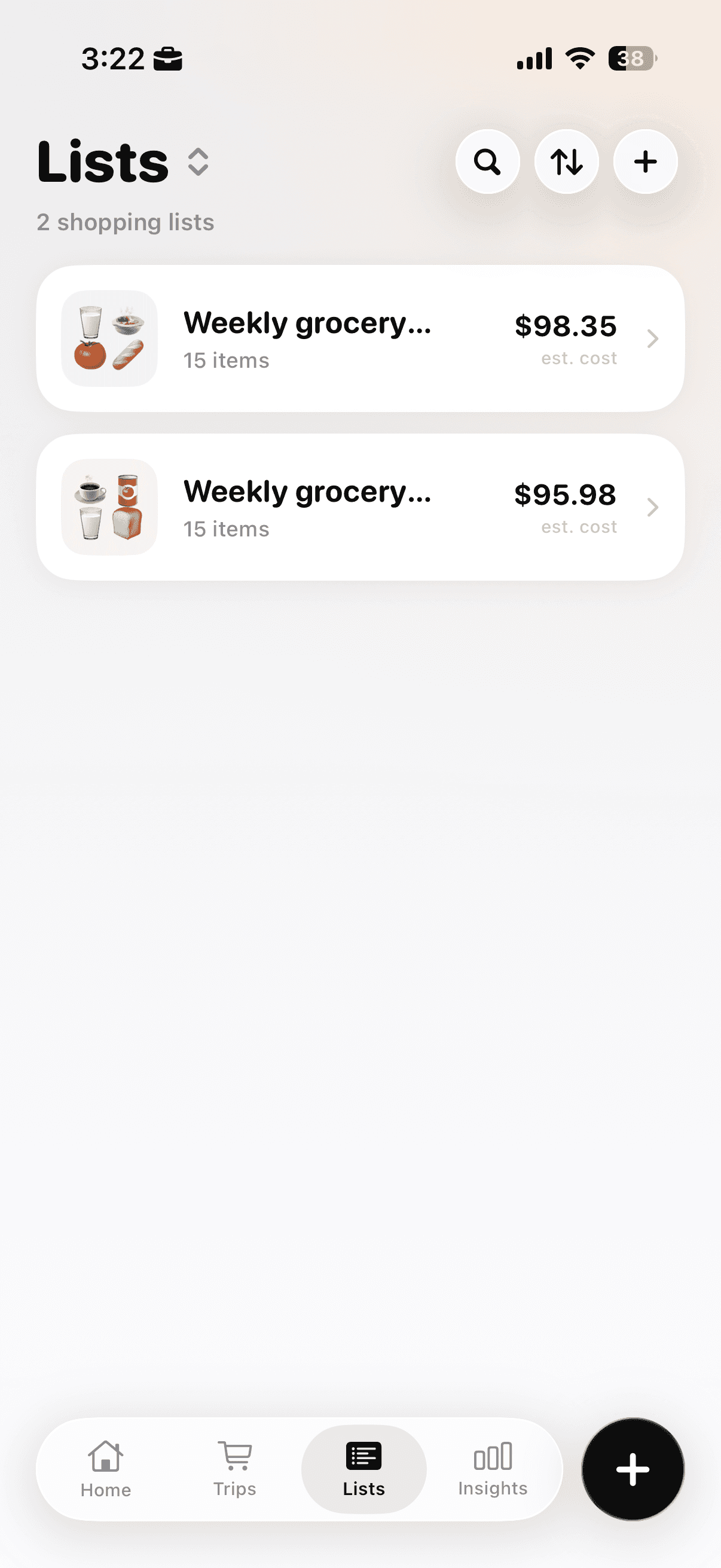
The Lists tab shows saved lists, item counts, and estimated totals.
Choose Plan a Shopping List. The other options are for starting a live trip or quickly totaling items, so this is the one you want when you are preparing before the store.
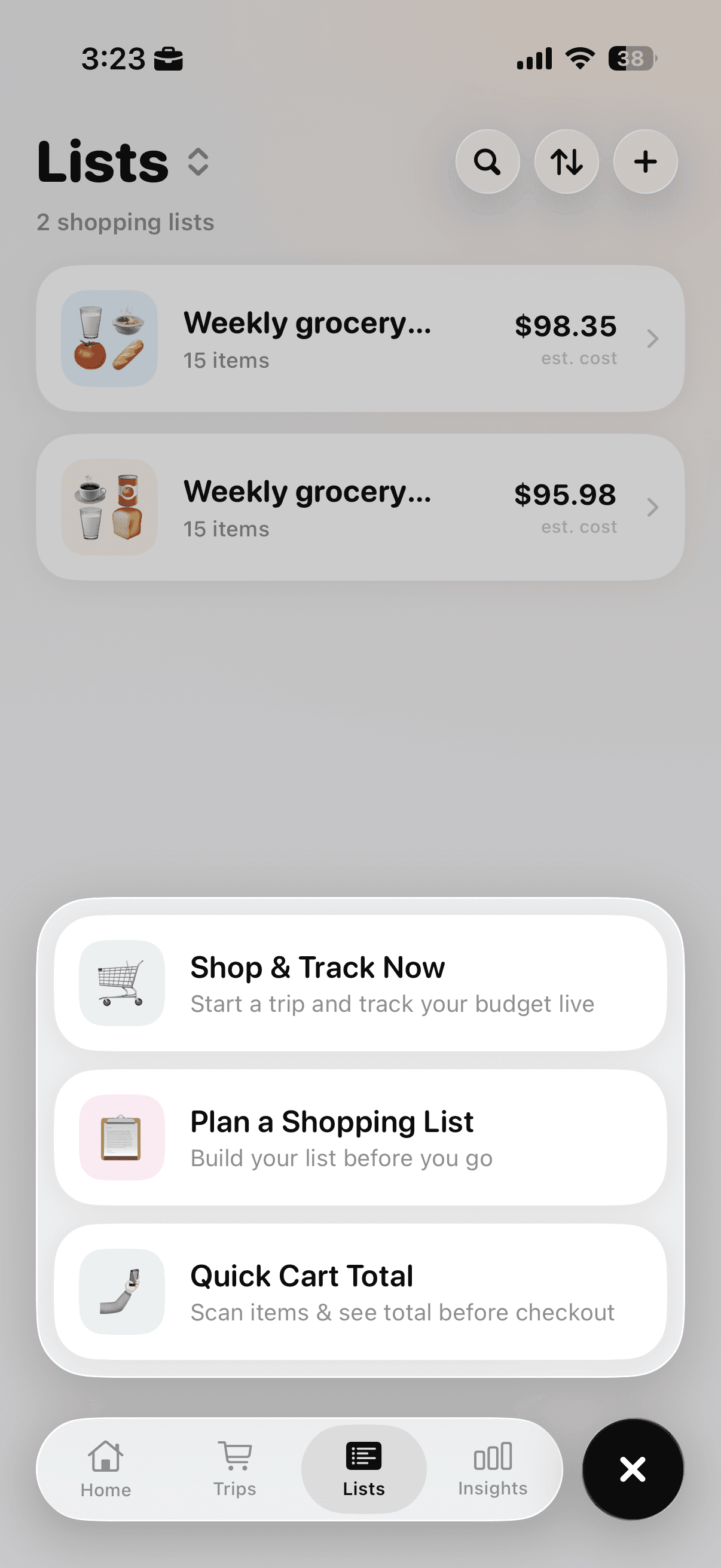
Select Plan a Shopping List to prepare before your trip.
Turn on Plan with AI, then describe what you need. A prompt such as “Weekly grocery for 2” gives it a useful starting point. You can be more specific by adding your budget, number of days, dietary needs, or the meals you already have in mind. Check the generated details before relying on them, especially quantities and prices.
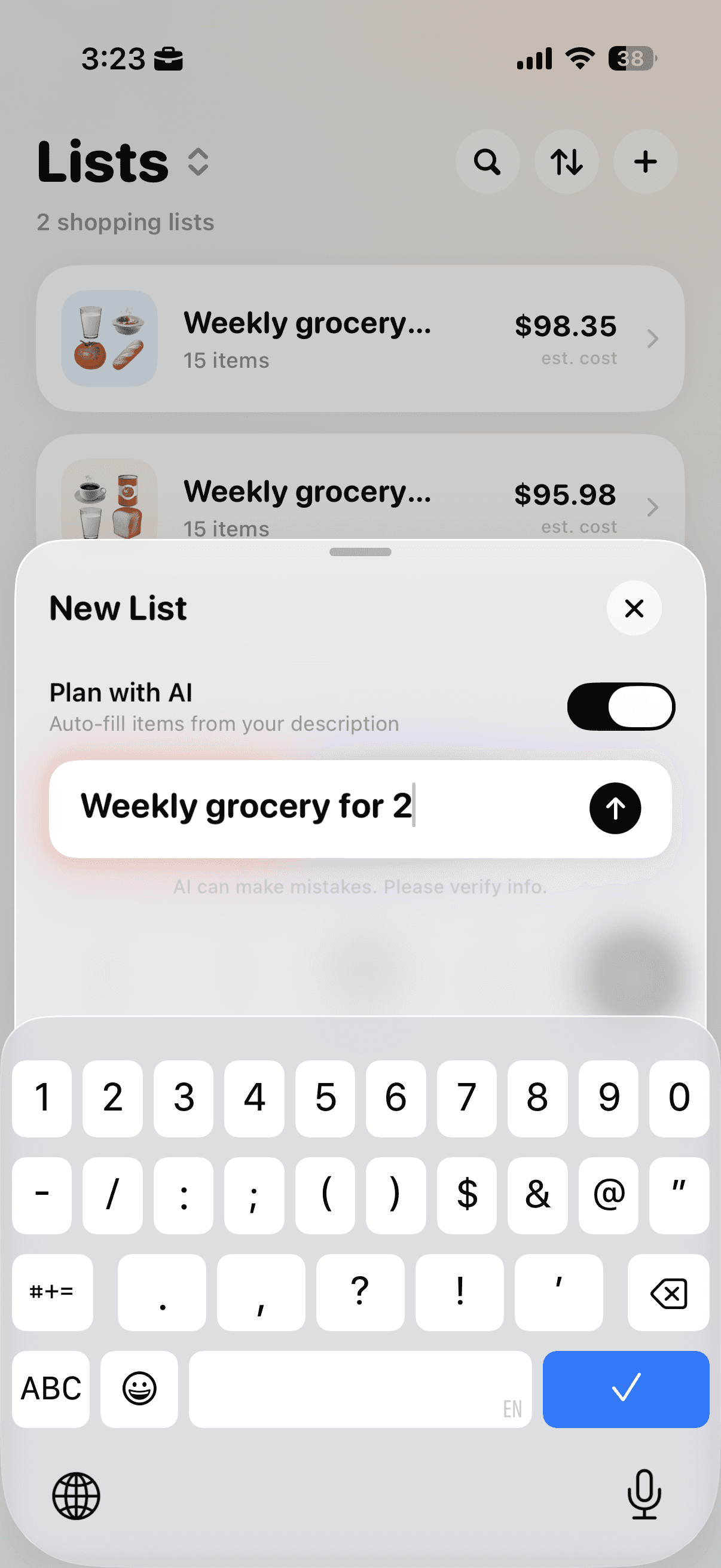
Turn on Plan with AI and enter a clear description of the trip.
Cart AI creates a planned list with item names, quantities, categories, individual estimates, and a running total. Treat that result as a draft. Remove anything already in your kitchen, change quantities to match your household, and swap items that do not fit the week. The speed comes from avoiding a blank page, not from skipping the final check.
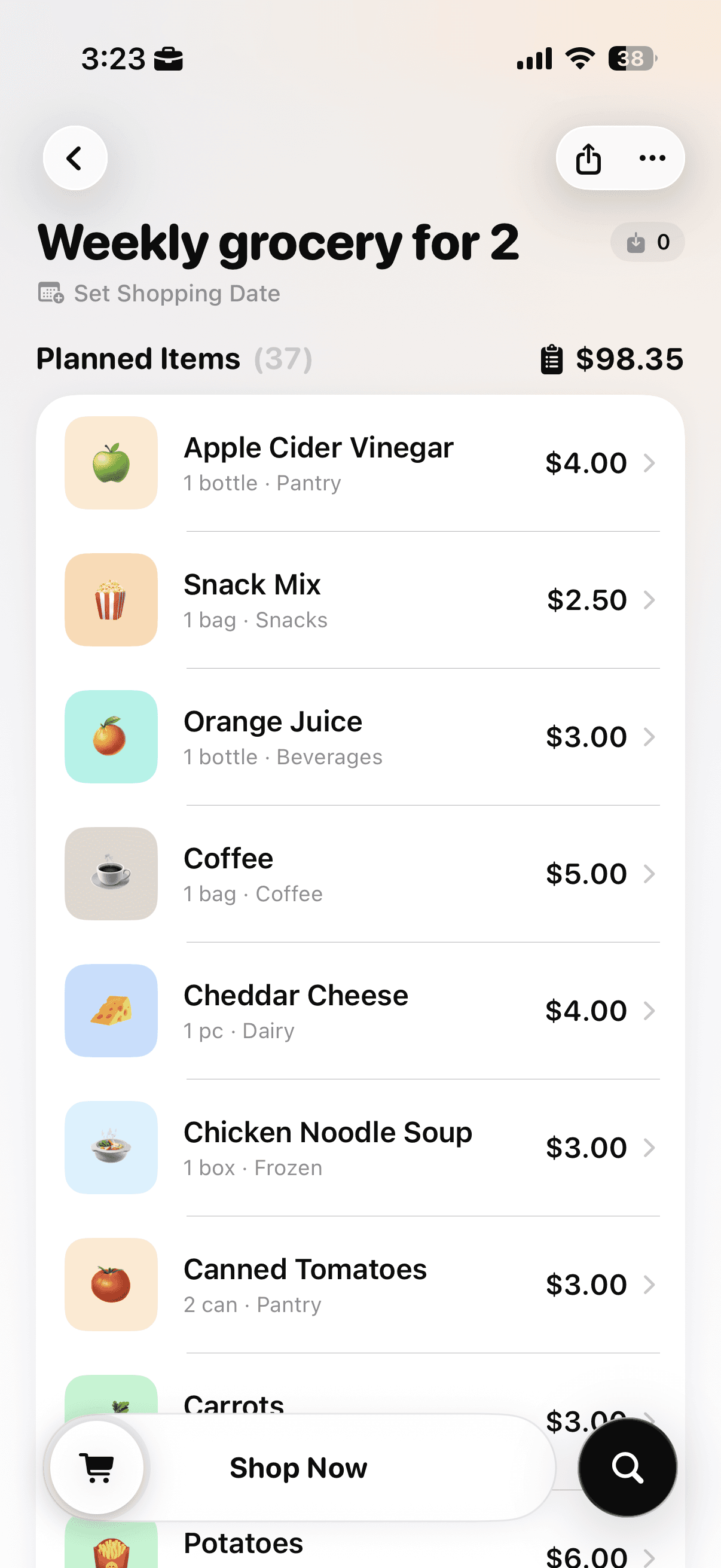
Review the generated items, quantities, categories, prices, and estimated total.
Make the list easy to use while you shop
The best grocery list is not the most detailed one. It is the one you can check quickly in a crowded aisle, adjust when prices change, and trust when you are tired. Keep it specific, keep it tied to meals, and give every optional item permission to stay on the shelf.
For a simple food-group framework while planning meals, USDA MyPlate offers guidance you can adapt to your household, preferences, and budget.
If you need a starting benchmark before setting the list limit, compare it with the average grocery cost by household size and then adjust for your own receipts.
If the blank page is the part that slows you down, Download Cart AI and use Plan with AI to create a first draft, then adjust it to your kitchen and budget before you shop.